Map out your processes in just a few minutes, right within your quality management system.

Model, structure, and bring your processes to life in the same environment as your documents, actions, and quality metrics.

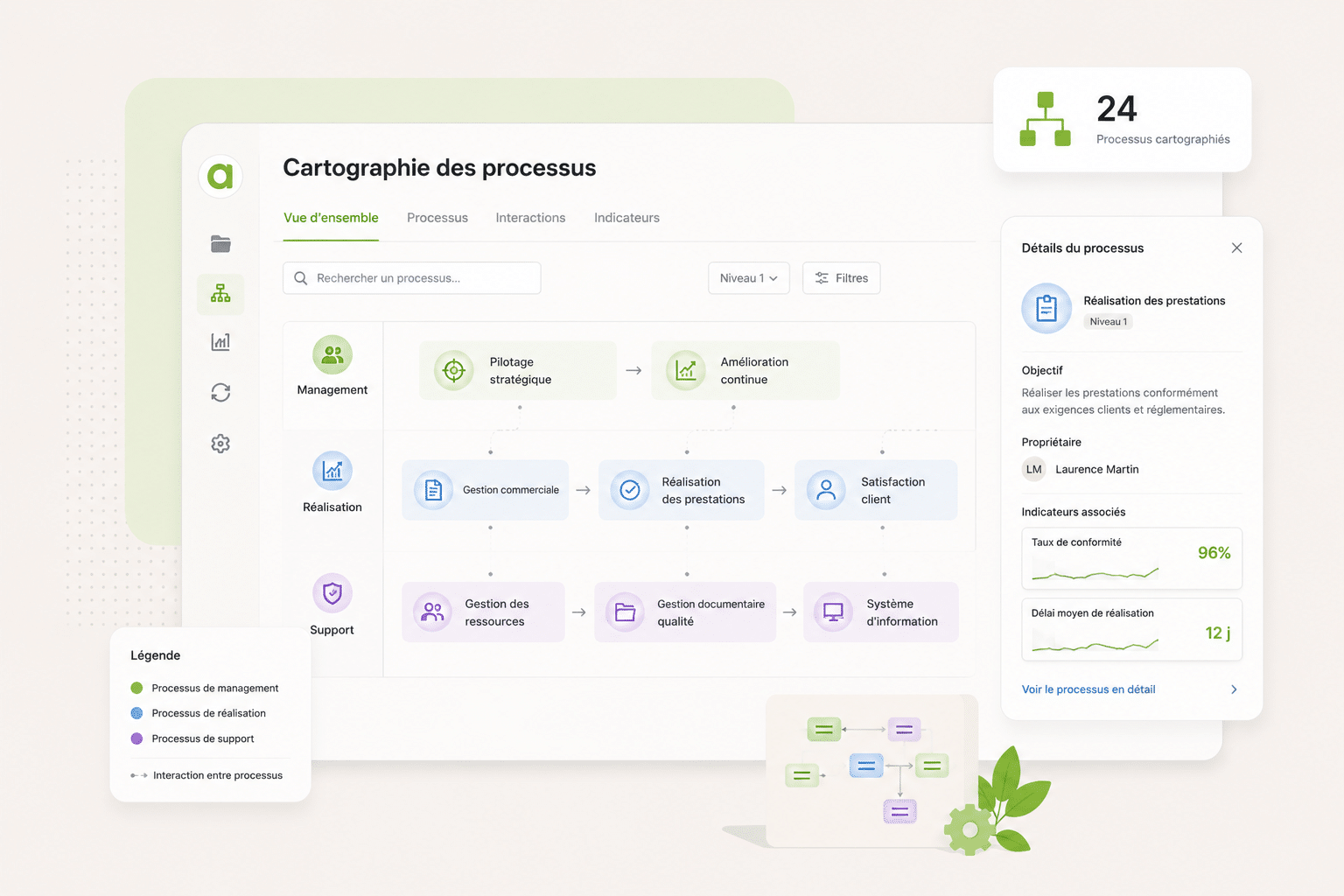
Cartographie des processus dans Agilium : processus de management, de réalisation et de support, avec la fiche détaillée d'un processus
Overview

A tool designed for quality —not just for drawing

Your processes remain connected, up to date, and in use by your teams not just archived for audit purposes.

Simple modeling with ready-to-use templates
Links to documents, indicators, NCs, risks, etc.
Easy-to-access and well-organized processes
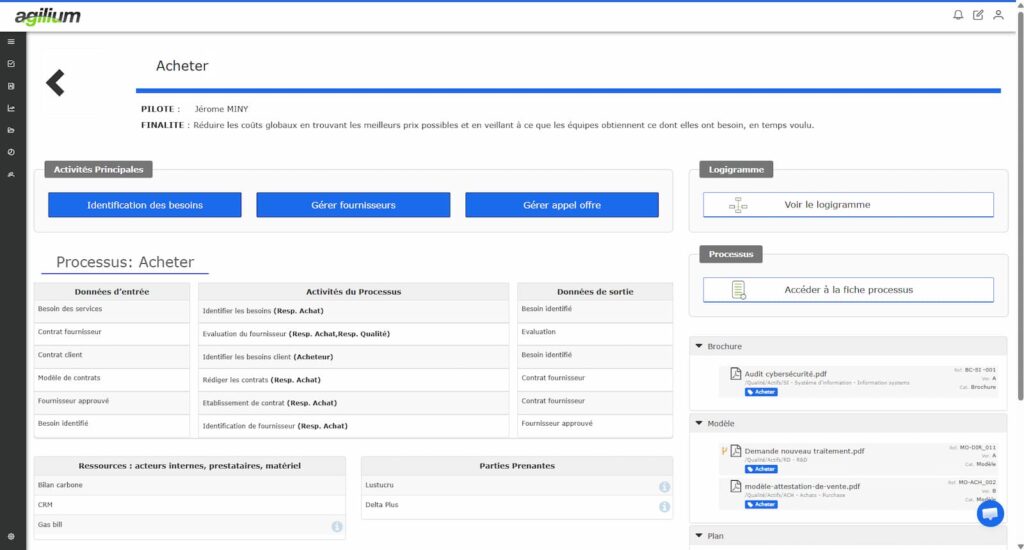
Capture d'écran de la cartographie des processus qualité dans Agilium
Portrait client, témoignage utilisateur Agilium Sylvie Matecki
Testimonial

“At UPEC, we’ve used Agilium’s process mapping at several levels: at the institutional level, the unit level, and the business domain level. This flexibility allows us to help everyone understand their place within their environment—whether in central services, academic units, or laboratories—and to more easily access the processes that are relevant to them.”

Sylvie Matecki, known as Materklas
Quality Coordinator at UPEC
WHAT IS IT FOR?

Process Diagram Module Features

A comprehensive module for modeling, structuring, and bringing your quality processes to life.

Feature 01

Draw fast

  • Drag-and-drop visual editor and a library of ready-to-use templates
  • Native quality formats that ISO auditors recognize: swimlane, SIPOC, turtle diagram, bow-tie
  • Import your existing diagrams (Visio, Word, Excel) without starting from scratch
  • AI-assisted generation of a first draft.
Feature 02

Structure

  • Multi-level navigation, from macro-processes down to sub-processes, in a single click
  • RACI matrix for each step: know who does what and who approves. Pinpoint grey areas and dependencies.
  • A single repository of actors (people, teams, roles), reused across all your processes and RACI matrices
Feature 03

Connect and collaborate

  • Every process linked to its documents, whatever their format
  • A process displayed right in your dashboard
  • Approval workflow so process owners and other contributors can help build the map, with mandatory sign-off from the person in charge before publication
  • Built-in review system to keep the process map up to date
  • Multilingual diagrams and interface
Feature 04

Keep it alive

  • Automatic periodic review reminders for each process, with review history available in one click during audits
  • Change history and approval workflow before publication
  • Your teams flag an error in one click, and the feedback goes straight to the quality manager
Feature 05

Share across the company

  • Viewing mini-site: a simple link to embed in your intranet, open to every employee with no license required.
  • PDF export: a single process or the entire process map, with a title block on every page. Only published versions are exported.
  • Your brand, your look: 4 ready-to-use themes, plus your brand color, shapes and font.
BENEFITS

What This Really Means for You

Useful processes that are actually used and tailored to your reality.

Processes that are easy to update

By using AI and models, you save valuable time

Compliance Guaranteed

A clear organizational structure, well-defined roles, and a documented version history: your quality system is ready to stand up to an audit.

Information that's easy for your team to find

One place for all your quality documents—no more excuses! They’re neatly organized and up to date.

A direct link to the rest of your QMS

Processes, documents, NC actions, and metrics all in one place for effective management.

Testimonials

What Our Customers Say About Agilium

250 organizations trust us to lead their quality initiatives. Here’s what they have to say—unfiltered.

Services

Training / Configuration

Our teams will assist you in modeling your initial processes and training your users, ensuring a quick and seamless transition tailored to your organization.

Équipe en réunion autour d'une table avec ordinateurs, tablettes et graphiques
Frequently Asked Questions

Everything You Want to Know About Agilium

A platform designed to centralize your operations, automate your processes, and engage your teams in a more streamlined quality initiative.

Can we try it before buying?

We can set up a trial workspace for you, available for 7 days.

Can we link an activity to a document without Agilium?

Yes, through a web address: a link to your document management system, your intranet or any tool available online.

What if we already use Agilium?

The two complement each other:
you sign in with your Agilium account;
activities link to the documents in your document management system: procedures, work instructions, forms;
processes are displayed directly in Agilium.
A linked document opens in Agilium with the user’s own permissions, so no one sees a document they are not allowed to access.

Do we need to use Agilium to use Agilium's process mapping module?

No. Agilium’s process mapping module works on its own, with its own accounts.

Can we keep several entities or repositories separate?

Yes, by creating several projects: by site, by subsidiary or by management system. Each project has its own process map, mini-site and share links.

Which languages?

The interface and the processes are available in 7 languages: French, English, German, Italian, Spanish, Portuguese and Polish. Each reader chooses their own language, and notification emails follow the recipient’s language.

We have sites abroad. Can processes be translated?

Yes. You write in your reference language, then translate into the languages you turn on. A dedicated screen lists everything still to be translated: activities, descriptions, swimlanes, process names, resources. You can also export the texts, have them translated and import them back. There is only one diagram: just the display language change

What happens if two people edit the same process?

A process being edited is locked for everyone else, who can see who is editing it. There is no risk of overwriting a colleague’s work.

Who can edit what?

There are three roles:

Role What they can do
Reader View published processes
Modeler Create and edit processes, publish them or submit them for approval
Administrator Everything a Modeler can do, plus users, approval workflow, theme, languages and recycle bin
How long does it take to get up and running?

A modeler draws their first process within an hour, thanks to ready-to-use templates, drag and drop, and automatic alignment and layout.

Ready to transform your quality approach ?

Join the 250 organizations that manage their quality with Agilium. Our experts based in Grenoble will guide you every step of the way—with no offshore staff and no surprises.